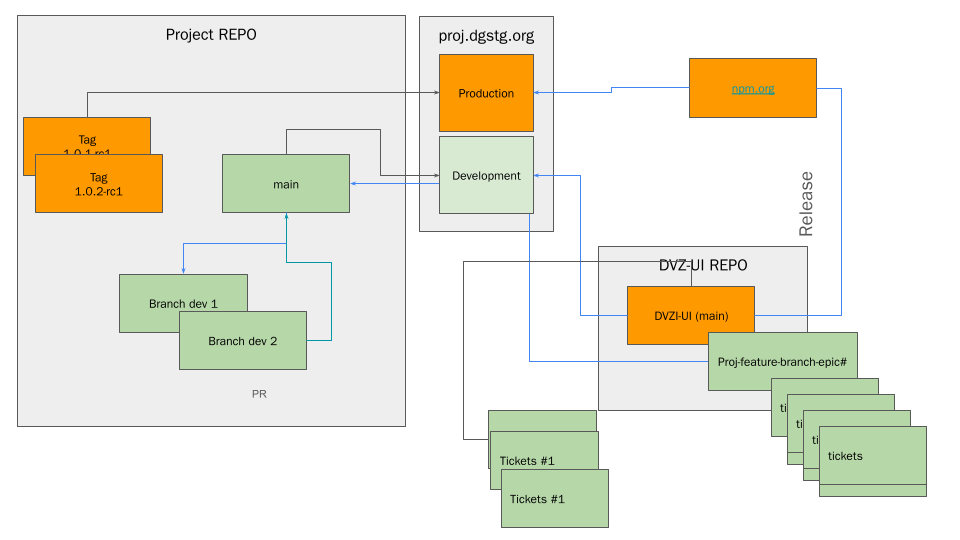
Recommended Release Process for Internal Projects
This guide is for the release of internal projects that are not part of the Data Viz platform.
Prerequisites
- You must have a GitHub account with access to the project.
- Node.Js 22.x or higher (For Javascript based projects)
- PNPM 10.x or higher (For Javascript based projects)
- Java 21.x (For Java based projects)
- Intellij IDEA (For Java based projects)
- Git (For all projects)
Overview
Internal projects follow a structured release workflow that involves multiple repositories, staging environments, and production deployments. This process ensures quality control through proper branching strategies, testing phases, and coordinated releases.
Key Components
- Project Repository - Main application code
- DVZ-UI Repository - Shared UI components and libraries
- Staging Environment -
proj.dgstg.orgfor testing - Production Environment -
data.orgfor live deployments - Ticket Management - JIRA Issue tracking and feature development
Release Workflow
Phase 1: Development
1.1 Feature Development
# Create a feature branch from main
git checkout main
git pull origin main
git checkout -b feature/TICKET-123-feature-name

# Develop your feature
# Make commits following conventional commit standards
git add .
git commit -m "feat: implement new feature for ticket TICKET-123"
1.2 Branch Management
- Main Branch: Contains stable, production-ready code
- Development Branches:
Branch dev 1,Branch dev 2- Integration branches for testing- Feature branches:
feature/TICKET-XXX-description - Bug fix branches:
bugfix/TICKET-XXX-description
1.3 UI Component Integration
If your project requires UI components from the DVZ-UI repository:
# In your project directory
npm install @devgateway/dvz-ui-react@latest
# or
pnpm add @devgateway/dvz-ui-react@latest
Phase 2: Release
2.1 Releasing the UI and Wordpress changes
- Open a pull request to the main branch of the DVZ-UI repository if you did changes in the UI components.
- Open a pull request to the main branch of the Data Viz Wordpress repository if you did changes in the Wordpress components.
- Once the pull request is merged, the changes will be released to the NPM registry.
- Once the changes are released, you can use the new version in your project.
- You can find the release process for the Data Viz UI here and the release process for the Data Viz Wordpress here.
- You can find the release process for the Data Viz UI here and the release process for the Data Viz Wordpress here.
2.2 Releasing the API changes
- Open a pull request to the main branch of the Data Viz API repository if you did changes in the API components.
- Once the pull request is merged, the changes will be released to the NPM registry.
- Once the changes are released, you can use the new version in your project.
- You can find the release process for the Data Viz API here.
2.3 Releasing the Project changes
- Open a pull request to the main branch of the project repository if you did changes in the project components.
- Once changes are merged to main, create release tags:
# For release candidates
git tag -a v1.0.1-rc1 -m "Release candidate 1.0.1-rc1"
git push origin v1.0.1-rc1

# For stable releases
git tag -a v1.0.2 -m "Stable release 1.0.2"
git push origin v1.0.2
- We will work on automating the release process for the project changes.
Release Process Diagram